

Reads Drawings, Counts Quantities,
Delivers Accurate Estimates Instantly.


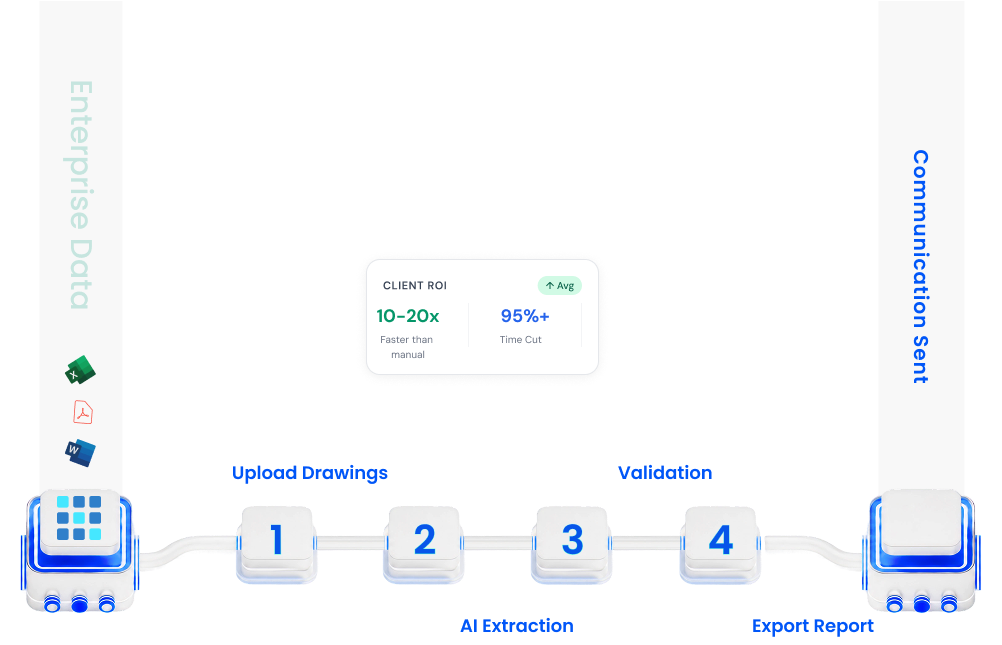
10-20x
Faster than manual
95%+
Time Cut
99%+
Accuracy
Five Steps. One Seamless Workflow.
.png)



.png)

CircuitLens AI
AI-Powered Construction Drawing Analysis for Instant Takeoffs
Process Flow
.png)
Manual Takeoffs Cause
Delays and Errors
Slow Processing
Manual takeoffs cost you time your competitors do not waste.

Instant Processing
Upload drawings and receive complete takeoffs in minutes, not days. Accelerate your bidding cycle.
Human Error
One missed symbol can cascade into a completely miscalculated estimate.

AI-Assisted Accuracy
Multi-layer detection combined with human verification ensures precise counts.
Resource Intensive
Your best estimators are stuck measuring, not strategizing.

Automated Workflow
From upload to export, detection and configuration run automatically with a final human review step.
Load
Automated Drawing Set Intake
Process Flow
Manual Takeoffs Cause
Delays and Errors
Slow Processing
Manual takeoffs cost you time your competitors do not waste.
Instant Processing
Upload drawings and receive complete takeoffs in minutes, not days. Accelerate your bidding cycle.
Human Error
One missed symbol can cascade into a completely miscalculated estimate.
AI-Assisted Accuracy
Multi-layer detection combined with human verification ensures precise counts.
Resource Intensive
Your best estimators are stuck measuring, not strategizing.
Automated Workflow
From upload to export, detection and configuration run automatically with a final human review step.
Extract
Automated Symbol and Data Extraction
Process Flow
Manual Takeoffs Cause
Delays and Errors
Slow Processing
Manual takeoffs cost you time your competitors do not waste.
Instant Processing
Upload drawings and receive complete takeoffs in minutes, not days. Accelerate your bidding cycle.
Human Error
One missed symbol can cascade into a completely miscalculated estimate.
AI-Assisted Accuracy
Multi-layer detection combined with human verification ensures precise counts.
Resource Intensive
Your best estimators are stuck measuring, not strategizing.
Automated Workflow
From upload to export, detection and configuration run automatically with a final human review step.
Analyze
Automated Symbol Count and Classification
Process Flow
.png)
Manual Takeoffs Cause
Delays and Errors
Slow Processing
Manual takeoffs cost you time your competitors do not waste.
Instant Processing
Upload drawings and receive complete takeoffs in minutes, not days. Accelerate your bidding cycle.
Human Error
One missed symbol can cascade into a completely miscalculated estimate.
AI-Assisted Accuracy
Multi-layer detection combined with human verification ensures precise counts.
Resource Intensive
Your best estimators are stuck measuring, not strategizing.
Automated Workflow
From upload to export, detection and configuration run automatically with a final human review step.
Validate
Automated Count Verification and Review
Process Flow
.png)
Manual Takeoffs Cause
Delays and Errors
Slow Processing
Manual takeoffs cost you time your competitors do not waste.
Instant Processing
Upload drawings and receive complete takeoffs in minutes, not days. Accelerate your bidding cycle.
Human Error
One missed symbol can cascade into a completely miscalculated estimate.
AI-Assisted Accuracy
Multi-layer detection combined with human verification ensures precise counts.
Resource Intensive
Your best estimators are stuck measuring, not strategizing.
Automated Workflow
From upload to export, detection and configuration run automatically with a final human review step.
Export
Automated Takeoff Report Delivery
Process Flow
.png)
Manual Takeoffs Cause
Delays and Errors
Slow Processing
Manual takeoffs cost you time your competitors do not waste.
Instant Processing
Upload drawings and receive complete takeoffs in minutes, not days. Accelerate your bidding cycle.
Human Error
One missed symbol can cascade into a completely miscalculated estimate.
AI-Assisted Accuracy
Multi-layer detection combined with human verification ensures precise counts.
Resource Intensive
Your best estimators are stuck measuring, not strategizing.
Automated Workflow
From upload to export, detection and configuration run automatically with a final human review step.
How it Works?
Submit your plans. Get accurate takeoffs in minutes — with optional review.
Key Benefits of
.png)

.png)
Win More Bids
Respond to RFQs faster

Reduce Risks
Eliminate measurement errors
.png)
Scale Capacity
Handle 5-10× more projects
.png)
Standardization
Consistent takeoff methodology

Real-time Updates
Instantly recalculate drawings
.png)
Talk to our team and see how your organization can transform its operations with an AI-enabled strategy built for scale.
Start your AI Journey

Technology is
in our DNA

.png)
